- Language
network rack wall mount
Wall-Mounted Network Rack: Comprehensive Guide to Selection, Installation & Maintenance
1. Introduction to Wall-Mounted Network Racks
A wall-mounted network rack is a specialized storage solution designed to house and organize network equipment (such as switches, routers, patch panels, and access points) by mounting directly on walls. Unlike floor-standing racks, these compact units are ideal for environments with limited space—including small offices, server rooms with constrained square footage, retail stores, and remote network closets. Their space-saving design not only optimizes vertical storage but also facilitates better cable management, equipment cooling, and easy access for maintenance, making them a staple in modern network infrastructure setups.
Key advantages of wall-mounted network racks include: space efficiency (eliminating the need for floor space), improved equipment security (many models feature lockable doors to prevent unauthorized access), enhanced cable organization (built-in cable management slots and reduce clutter), and flexible installation (adaptable to various wall types and room layouts). Whether for a small business’s basic network setup or a large enterprise’s distributed edge computing nodes, wall-mounted racks offer a scalable and practical solution for equipment housing.
2. Key Factors for Selecting a Wall-Mounted Network Rack
2.1 Rack Size & U Height
The "U" (unit) height is the standard measurement for network rack size, with 1U equal to 1.75 inches (44.45mm). Wall-mounted racks typically range from 2U to 24U, depending on the volume of equipment to be installed. For small-scale setups (e.g., a home office or a small retail store with 1-2 switches and a router), a 2U-6U rack is sufficient. For larger edge deployments or multi-device setups (e.g., a branch office with patch panels, PoE switches, and a firewall), an 8U-24U rack may be necessary.
Additionally, consider the depth of the rack—ensure it can accommodate the longest piece of equipment (e.g., some enterprise-grade routers or switches have greater depth than consumer-grade models). Common depths for wall-mounted racks range from 12 inches to 36 inches; measure your equipment’s depth beforehand to avoid compatibility issues.
2.2 Load Capacity
Load capacity refers to the maximum weight the rack can safely support, a critical factor to prevent wall damage or equipment failure. Wall-mounted racks typically have a static load capacity (weight when the rack is stationary) ranging from 50 lbs to 500 lbs or more. When selecting, calculate the total weight of your equipment (including switches, routers, cables, and accessories) and choose a rack with a load capacity that exceeds this total by 20-30% to account for future expansions or additional equipment.
2.3 Material & Durability
High-quality wall-mounted racks are usually constructed from cold-rolled steel, which offers excellent strength, corrosion resistance, and durability. Steel racks are ideal for industrial environments, server rooms, or areas with high humidity. For lighter-duty applications (e.g., home offices), aluminum racks are also available—they are lighter in weight but have lower load capacity compared to steel. Additionally, look for racks with a powder-coated finish, which provides an extra layer of protection against scratches and rust.
2.4 Security Features
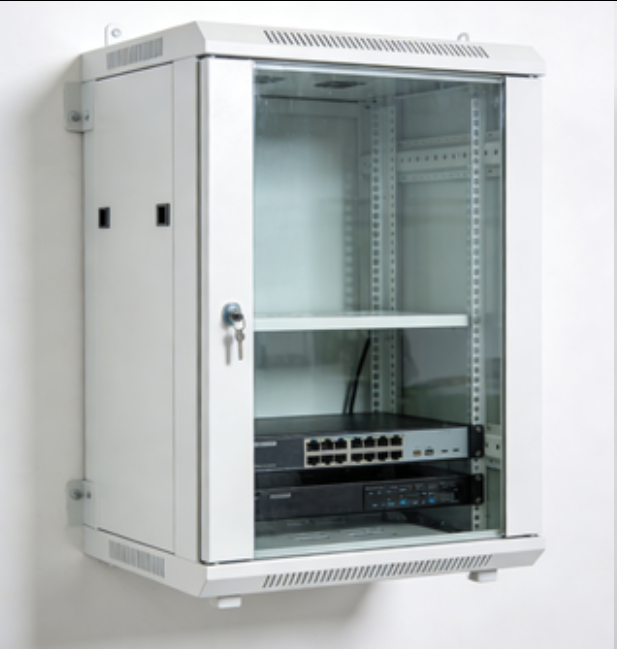
To protect sensitive network equipment from theft or unauthorized access, choose a wall-mounted rack with built-in security features. Common security options include lockable front and rear doors (using key locks or combination locks), side panels (to prevent access from the sides), and cable entry points with covers (to secure cable connections). For environments with strict security requirements (e.g., financial institutions or government offices), consider racks with tamper-evident locks or integration with access control systems.
2.5 Cable Management
Effective cable management is essential for maintaining a organized network setup, reducing signal interference, and simplifying maintenance. Look for wall-mounted racks with integrated cable management features such as cable management arms, patch panels, and cable entry/exit slots. These features help route cables neatly, separate power and data cables (to avoid EMI interference), and make it easy to identify and access specific cables when needed.
3. Step-by-Step Installation Guide for Wall-Mounted Network Racks
3.1 Preparation & Safety Precautions
Before installation, gather the necessary tools and materials: wall-mounted network rack, mounting brackets, screws, anchors (appropriate for your wall type—drywall, concrete, brick, etc.), a level, a drill, a screwdriver, a tape measure, and a stud finder (for drywall installations). Additionally, ensure you have a helper to assist with lifting the rack (especially larger models) to avoid injury.
Safety precautions: Turn off power to any nearby electrical outlets or circuits to prevent electric shock. Verify the wall’s load-bearing capacity—avoid mounting the rack on weak walls (e.g., drywall without studs) that cannot support the rack’s weight plus the equipment. If mounting on concrete or brick walls, use masonry anchors designed for heavy loads.
3.2 Choosing the Installation Location
Select a location that meets the following criteria: (1) Sufficient space around the rack (at least 12 inches of clearance on the front and rear for equipment access and ventilation); (2) sources of heat (e.g., radiators, air conditioners) or moisture (e.g., windows, water pipes) to prevent equipment damage; (3) Close to power outlets and network cabling to minimize cable runs; (4) At a height that allows easy access to equipment (typically 4-6 feet from the floor).
3.3 Mounting the Rack to the Wall
Use a stud finder to locate wall studs (for drywall installations). Mark the stud positions with a pencil—this is where you will attach the mounting brackets (studs provide the strongest support for heavy racks).
Hold the rack’s mounting brackets against the wall, aligning them with the marked stud positions. Use a level to ensure the brackets are straight, then mark the screw holes on the wall.
Drill pilot holes into the marked positions (use a drill bit slightly smaller than the screws for a tight fit). For concrete/brick walls, drill holes using a masonry drill bit, then insert masonry anchors into the holes.
Attach the mounting brackets to the wall using the appropriate screws and anchors. Tighten the screws securely to ensure the brackets are firmly fixed.
Lift the network rack (with helper assistance) and align it with the mounted brackets. Secure the rack to the brackets using the provided bolts or screws, tightening them evenly to distribute the weight.
Use a level again to verify that the rack is straight and level. Adjust if necessary by loosening the screws slightly, repositioning the rack, and retightening.
3.4 Installing Equipment & Managing Cables
Install equipment in the rack using rack screws and cage nuts (most racks come with these accessories). Start with heavier equipment at the bottom of the rack to lower the center of gravity and improve stability.
Route power and data cables through the rack’s cable management features, which can degrade network performance.
Use cable ties or Velcro straps to bundle cables neatly, labeling each cable with a tag to identify its purpose (e.g., "Router to Switch 1," "Patch Panel Port 5 to Office PC").
Connect the equipment to power and network sources, then test each device to ensure it is functioning properly.
4. Maintenance Tips for Wall-Mounted Network Racks
Regular Inspection: Conduct monthly inspections to check for loose screws (on the rack, brackets, and equipment), signs of corrosion or damage, and cable wear. Tighten any loose components and replace damaged cables or hardware promptly.
Ventilation & Cooling: Ensure the rack’s vents are not blocked by cables or other objects—proper airflow is critical to prevent equipment overheating. For racks with multiple heat-generating devices (e.g., PoE switches), consider adding a rack-mounted fan or cooling unit.
Cable Management Upkeep: Periodically reorganize cables to avoid tangles and ensure labels are still legible. Remove any unused cables to reduce clutter and improve airflow.
Security Checks: Verify that lockable doors and panels are functioning properly, and replace lost or damaged keys promptly. Restrict access to the rack to authorized personnel only.
Load Capacity Monitoring: When adding new equipment, ensure the total weight does not exceed the rack’s load capacity. Avoid overloading the rack, as this can strain the wall mounting and lead to structural damage.
5. Common Mistakes to Avoid
Underestimating Load Capacity: Choosing a rack with insufficient load capacity can lead to wall damage, rack failure, or equipment injury. Always calculate the total equipment weight and select a rack with a safety margin.
Mounting on Weak Surfaces: Avoid mounting heavy racks on drywall without studs, as this can cause the rack to pull away from the wall. Use appropriate anchors for non-stud installations (e.g., toggle bolts for drywall) only for lighter racks.
Poor Cable Management: Tangled or unorganized cables can block airflow, cause interference, and make maintenance difficult. Invest time in proper cable routing and labeling during installation.
Inadequate Ventilation: Placing the rack in a confined space or blocking vents can lead to equipment overheating, which reduces performance and shortens lifespan.
Ignoring Security: Leaving the rack unlocked or accessible to unauthorized personnel increases the risk of theft or tampering with sensitive network equipment.
6. Conclusion
A wall-mounted network rack is a versatile and space-efficient solution for organizing and protecting network equipment in various environments. By carefully selecting the right rack (based on size, load capacity, material, and security features), following proper installation procedures, and maintaining the rack regularly, you can ensure a reliable and efficient network infrastructure. Whether for a small home office or a large enterprise branch, a well-chosen and installed wall-mounted network rack will streamline equipment management, improve security, and support future network expansions.
-
-
-
-
-
-
-
-
-
-
Network Patch Cord Cat8
Oct 23, 202592
-
Network Rack Wall Mount with Glass Door
Jan 07, 202679
-
Network Rack Wall Mount 9U
Jan 06, 202675
-

Network Cable Management Tray
Oct 30, 202573
-
Network Cable Management Under Desk
Dec 25, 202572